Setting up an evolution simulation using Pygame [devlog 1]
This project is available here if you’d like to check it out.
There aren’t many animations that will remain unique over 100 hours. And since I love AI, I chose to have my animation be an evolution simulation. I will port it to unity eventually but just to get the prototype out, I’m using Pygame. I’d say this has gotten off to a pretty great start!
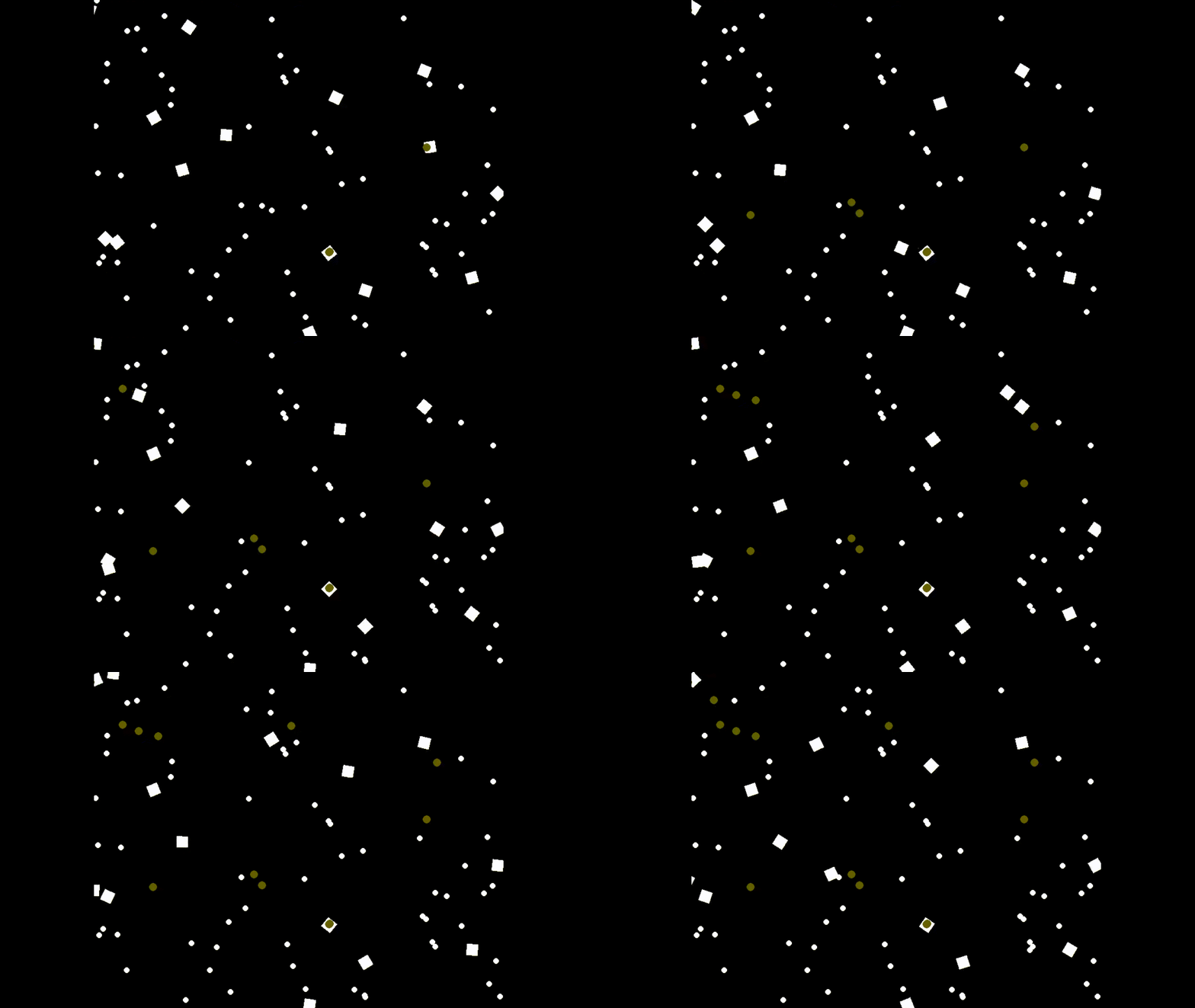 the squares are the organisms, white circles are food and green circles are eggs
Pygame runs one loop continuously and all the game updates happens in that one loop. Here’s the basic structure of the pygame project.
1
2
3
4
5
6
7
8
9
10
11
12
13
14
15
16
17
18
19
20
21
22
23
24
25
26
27
28
import pygame
import sys

# Initialize Pygame
pygame.init()

# Screen dimensions
WIDTH, HEIGHT = 800, 600

# Create the game window
screen = pygame.display.set_mode((WIDTH, HEIGHT))
pygame.display.set_caption("Evolution Simulation")

# Main game loop
running = True
while running:
    for event in pygame.event.get():
        if event.type == pygame.QUIT:
            running = False

    # Do stuff

    # Update the display
    pygame.display.update()

# Quit Pygame
pygame.quit()
sys.exit()
First, let’s start with the most important element, the organism. I’ve coded it as a seperate python module that I’ll import into the main file.
Here’s the code for organism.py. I must admit that the organism is rather simplistic as it takes the distance to nearest food as the sole input to its neural network. Before implementing a more complex neural network though, I want to work on optimising the code because right now the time complexity of one game loop is O(of) where o is the number of organisms and f is the number of food particles. You’ll see this in the evolutionsim.py file later.
1
2
3
4
5
6
7
8
9
10
11
12
13
14
15
16
17
18
19
20
21
22
23
24
25
26
27
28
29
30
31
32
33
34
35
36
37
38
39
40
41
42
43
44
45
46
47
48
49
50
51
52
53
54
55
56
57
58
59
60
61
62
63
64
65
66
67
68
69
70
71
72
73
74
75
76
77
78
79
80
81
82
83
84
85
86
87
88
89
90
91
92
93
94
95
96
97
98
99
100
101
102
103
104
105
106
107
108
109
110
111
112
113
114
115
116
117
118
119
120
121
122
123
124
125
126
127
128
129
130
131
132
133
from keras import Sequential
import numpy as np
import random
from keras import layers
from math import cos,sin,radians
import pygame

class organism:
    '''
    Defines an organism that moves around, eats food and lays eggs
    '''
    # converts a sample space from [0,1] to [-1,1]
    normprob = lambda self,x: x*2-1
    # divides distance with the diagonal length of the screen
    divdist = lambda self,x,settings: x/(settings['x_max']**2+settings['y_max']**2)**.5

    def __init__(self,settings,name=None):
        # The neural network of the organism takes in 1 input: distance to nearest food
        self.brain = Sequential([
            layers.Input(shape=(1,1)),
            layers.Dense(5,activation='tanh',name='l1'),
            layers.Dense(5,activation='tanh',name='l2'),
            layers.Dense(2,activation='tanh',name='l3')
            ])

        # Organism's coordinates
        self.x = random.uniform(settings['x_min'],settings['x_max'])
        self.y = random.uniform(settings['y_min'],settings['y_max'])

        # Organism's rotation, velocity and acceleration
        self.r = random.uniform(0,360)
        self.v = random.uniform(0,settings['v_max']//2)
        self.dv = random.uniform(-settings['dv_max'], settings['dv_max'])

        # health, distance to nearest food, orientation of nearest food
        self.health = 700
        self.d_food = 100
        self.r_food = 0

        # its name
        self.name = name

    def move(self,settings):
        '''
        moves the organism

        sends the organism distance to nearest food to the NN and updates the
        x,y coordinates based on the NN output
        '''
        # normalising distance to nearest food to [-1,1] (to avoid NN saturation)
        input_data = np.array([[[self.normprob(self.divdist(self.d_food,settings))]]])
        # the outputs of the NN are the change in rotation and velocity
        nndr,nndv = [x.numpy() for x in self.brain(input_data)[0][0]]

        # scaling neural network rotation output
        self.r += nndr * settings['dr_max'] * settings['dt']
        self.r %= 360

        # scaling neural network velocity output and and checking for max velocity
        self.v += nndv * settings['dv_max'] * settings['dt']
        if self.v < 0: self.v = 0
        if self.v > settings['v_max']: self.v = settings['v_max']

        # updating the organism's coordinates
        dx = self.v * cos(radians(self.r)) * settings['dt']
        dy = self.v * sin(radians(self.r)) * settings['dt']
        self.x += dx
        self.y += dy

    def layEgg(self,mutation_rate):
        '''
        the organism lays an egg!
        '''
        egg = Egg(self,mutation_rate)
        return egg

    def draw(self, screen, width, height):
        '''
        pygame stuff to make the organism visible on screen
        '''
        rotated_rect = pygame.Surface((width, height), pygame.SRCALPHA)
        pygame.draw.rect(rotated_rect, (255,255,255), (0, 0, width, height))
        rotated_rect = pygame.transform.rotate(rotated_rect, -self.r)
        new_rect = rotated_rect.get_rect(center=(self.x, self.y))
        screen.blit(rotated_rect, new_rect.topleft)

class Egg:
    '''
    defines an egg that hatches into a mutated version of its parent
    '''
    def __init__(self,parent,mutation_rate):
        # the time it was laid
        self.laid = pygame.time.get_ticks()
        # copies the parent's NN
        self.brain = parent.brain
        # and x,y coordinates
        self.x = parent.x
        self.y = parent.y
        # probability of a mutation occuring
        self.mutation_rate = mutation_rate

    def hatch(self,settings):
        '''
        after incubation period, the egg hatches into an organism that's
        slightly mutated from its parent
        '''
        # Copies the parent organism
        egg_organism = organism(settings)
        egg_organism.brain = self.brain
        egg_organism.x = self.x
        egg_organism.y = self.y

        # Applies mutations to the organism
        # This for loop slightly modifies the weights of the NN based on the
        # mutation rate
        for layer in egg_organism.brain.layers:
            weights = layer.get_weights()
            x,y = weights[0].shape
            for m in range(x):
                for n in range(y):
                    if random.random() <= self.mutation_rate:
                        weights[0][m][n] += random.gauss(0,.04)
            layer.set_weights(weights)

        # ADD capability for neural network architecture to change

        return egg_organism

    def draw(self,screen):
        '''
        pygame stuff to make the egg visible
        '''
        pygame.draw.circle(screen, (100, 100, 0), (self.x, self.y), 7)
Food is very simple in this simulation. I’ll eventually let food evolve, but that would require a more complex environment to interact with and more optimised code.
I present to you food.py
1
2
3
4
5
6
7
8
9
10
11
12
13
14
15
import pygame
from random import uniform

class food:
    '''
    a pretty simple class, the food just appears and waits to get eaten
    '''
    def __init__(self,settings):
        self.x = uniform(settings['x_min'],settings['x_max'])
        self.y = uniform(settings['y_min'],settings['y_max'])
        # nutrition is directly added to the health of an organism
        self.nutrition = 200

    def spawn(self,screen,radius):
        pygame.draw.circle(screen, (255, 255, 255), (self.x, self.y), radius)
Finally, here’s evolutionsim.py that runs all the calculations and updates the display of the sumulation.
1
2
3
4
5
6
7
8
9
10
11
12
13
14
15
16
17
18
19
20
21
22
23
24
25
26
27
28
29
30
31
32
33
34
35
36
37
38
39
40
41
42
43
44
45
46
47
48
49
50
51
52
53
54
55
56
57
58
59
60
61
62
63
64
65
66
67
68
69
70
71
72
73
74
75
76
77
78
79
80
81
82
83
84
85
86
87
88
89
90
91
92
93
94
95
96
97
98
99
100
101
102
103
104
105
106
107
108
import pygame
from organism import organism
import random
from food import food
import sys
import os

# Initialize Pygame
pygame.init()

# Screen dimensions
WIDTH, HEIGHT = 800, 600

# Create the game window
screen = pygame.display.set_mode((WIDTH, HEIGHT))
pygame.display.set_caption("Evolution Simulation")

# Colors
WHITE = (255, 255, 255)
BLACK = (0, 0, 0)

# Simulation Settings
settings = {
    'x_min': 0,
    'x_max': WIDTH,
    'y_min': 0,
    'y_max': HEIGHT,
    'v_max': 30,
    'dv_max': 20,
    'dr_max': 90,
    'dt': .2,
    'incubation':15000,
    'FPS' : 30
}

# Initialize list of organisms
my_organisms = [organism(settings) for _ in range(15)]
# Initialize list of food
many_food = [food(settings) for _ in range(70)]
# Initialize list of eggs
eggs = []

# Main game loop
running = True

last_food_spawn = pygame.time.get_ticks()
clock = pygame.time.Clock()

while running:
    # Checking for quit
    for event in pygame.event.get():
        if event.type == pygame.QUIT:
            running = False

    screen.fill(BLACK)

    # Spawns food randomly between 1 and 5 seconds
    food_spawn_interval = random.uniform(1000,5000)
    cur_tick = pygame.time.get_ticks()
    if cur_tick - last_food_spawn > food_spawn_interval:
        many_food.append(food(settings))
        last_food_spawn = cur_tick

    # This loop does a lot of calculations
    for my_organism in my_organisms:
        min_dist = WIDTH+HEIGHT
        for some_food in many_food:
           cur_dist = (my_organism.x - some_food.x)**2 + (my_organism.y - some_food.y)**2
           # Searching for closest food to each organism
           min_dist = min(min_dist,cur_dist)
           # Checks for collision with food
           if cur_dist <= 400:
               # Eats food, updates organism health, if organism is healthy it might lay an egg
               many_food.remove(some_food)
               my_organism.health += some_food.nutrition
               if my_organism.health >= 600 and random.random() < .8:
                   # Lays the egg
                   eggs.append(my_organism.layEgg(.1))
        my_organism.d_food = min_dist

    # This loop moves the organisms and reduces their health
    for my_organism in my_organisms:
        my_organism.move(settings)
        my_organism.draw(screen,20,20)
        my_organism.health-=1.5
        # Organism dies
        if my_organism.health <= 0:
            my_organisms.remove(my_organism)

    # Displays the food
    for some_food in many_food:
        some_food.spawn(screen,5)

    # Waits for incubation time to elapse and hatches the egg into an organism
    for egg in eggs:
        if cur_tick >= egg.laid + settings['incubation']:
            my_organisms.append(egg.hatch(settings))
            eggs.remove(egg)
        egg.draw(screen)


    # Update the display
    pygame.display.update()
    clock.tick(settings['FPS'])

# Quit Pygame
# Don't ask me why I use such a forceful way to close the program, the normal method just wasn't working.
os._exit(0)
Feel free to reach out to me if you need me to explain some parts in more detail. Next up in my todolist is to implement some form of spatial optimisation, because the biggest limitations of the project currently is the tiny simulation size and simplistic organisms.
Until next time!